What Are Agent Plugins? The New Standard for AI Add-Ons Explained
A new open standard lets one AI add-on work across ChatGPT, Copilot, Cursor and more. Here is what Agent Plugins contain, what they leave out and how to stay safe.

In this article
- What are Agent Plugins, in simple terms?
- Who created the Agent Plugins standard?
- Which apps support the plugins today?
- What is inside a plugin folder?
- How do Agent Plugins load inside an agent?
- What do Agent Plugins not cover?
- How do plugins work in ChatGPT?
- Are Agent Plugins safe to install?
- Who should care about Agent Plugins, and who can skip them?
- A practical checklist before you install a plugin
- What happens next for Agent Plugins?
- Agent Plugins: FAQs
- Sources
Agent Plugins: the short answer
Agent Plugins are a new open standard for packaging add-ons for AI agents. A plugin is a folder with a small plugin.json file, plus optional skills (written instructions) and MCP server settings (connections to apps and data). Version 1.0.0 arrived on 6 August 2026. At launch, ChatGPT, Codex, Cursor, GitHub Copilot, Kiro and VS Code all supported it, so one plugin can work in several agents.
Agent Plugins are the latest attempt to fix a quiet but real problem with AI agents. Every assistant now lets you add extra abilities, such as a set of instructions for writing reports or a connection to your calendar. However, each product packaged those add-ons in its own way. As a result, a developer who built something useful for one agent often had to rebuild it for the next.
So the new standard tries to end that duplication. It does not create a new app store, and it does not decide what an agent may do. Instead, it defines a shared folder layout so that compatible agents can find and load the same add-on. This guide explains what that means in plain English, who is behind it, what it does and does not cover, and what ordinary users should check before they install anything.
Also, this article draws on the published specification, the launch announcements and OpenAI’s help pages, all checked in October 2026. However, TheJusGrow has not built or tested plugins for this piece.
What are Agent Plugins, in simple terms?
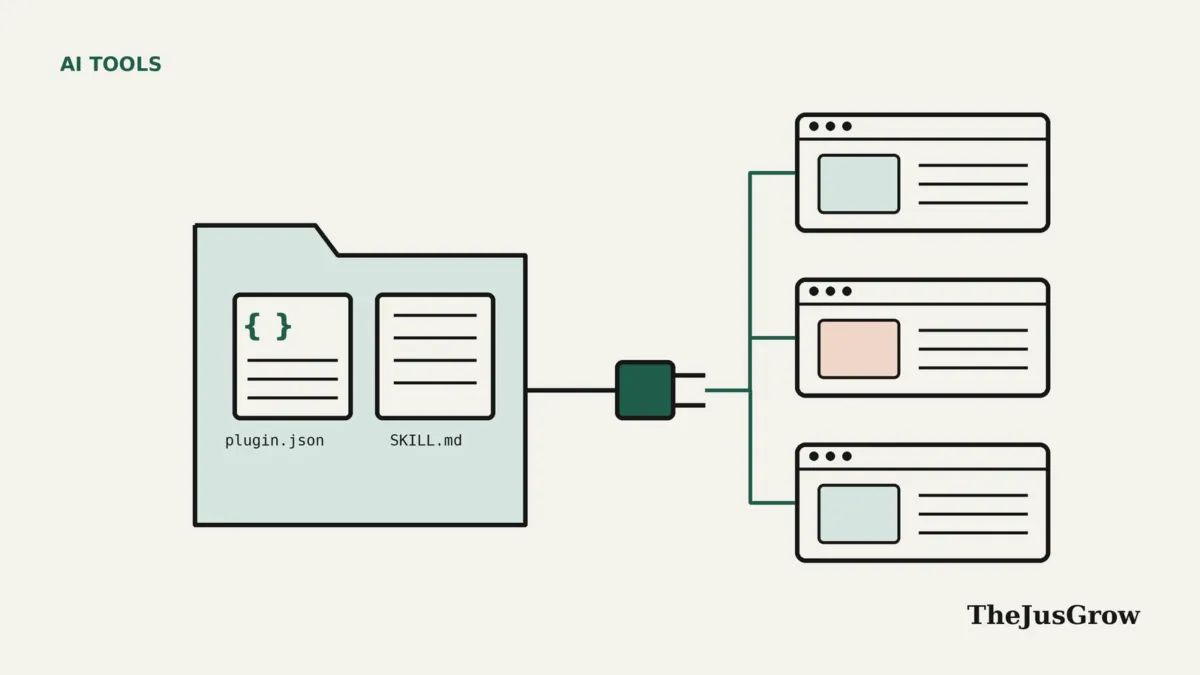
Think of a plugin as a labelled box of tools for an AI agent. In this picture, the label is a file called plugin.json. Then, inside the box, there can be two kinds of tools.
- Skills. These are folders of written instructions, sometimes with scripts or reference files, that teach an agent how to do a specific job. For example, a skill might explain how your team formats a weekly report.
- MCP servers. These are connection settings that let an agent talk to outside tools and data through the Model Context Protocol. For instance, an MCP server might connect the agent to a project tracker or a database.
The official specification calls the format “an open, vendor-neutral standard” for packaging reusable components. In practice, that means a plugin author can write the box once. Then any agent that follows the rules should know where to look for the skills and the connections.
Also, if you are new to the connection side, our guide to the Model Context Protocol explains MCP from the ground up.
Who created the Agent Plugins standard?
Vercel, the web development company, proposed the standard. According to Vercel’s launch post, people from AWS, Anysphere (the maker of Cursor), GitHub, Microsoft and OpenAI then helped shape it into version 1.0.0. Finally, the release went public on 6 August 2026.
The project also has a Technical Steering Committee. Its first members are core maintainers from Amazon, Cursor, Microsoft, OpenAI and Vercel. The specification site says the work happens in public, with proposals discussed on GitHub and Discord. Similarly, it says new features need a concrete portability need and support from companies that would implement them.
Still, one name is notable by its absence. Anthropic created the Agent Skills format that sits inside these plugins, according to the Agent Skills website. Even so, Anthropic was not among the launch contributors named by Vercel, and Claude does not appear on the Agent Plugins compatible-clients page as of October 2026. That said, Claude does support Agent Skills on their own.
Which apps support the plugins today?
At launch, Vercel listed six products: ChatGPT and Codex, Cursor, GitHub Copilot, Kiro and VS Code. Since then, the standard’s compatible clients page has grown. As of October 2026, it also lists Hermes Agent, OpenClaw, Grok Bot, NanoClaw and OpenHands.
| Client (as listed, October 2026) | Agent Skills | MCP connection types |
|---|---|---|
| VS Code | Yes | stdio, Streamable HTTP, legacy SSE |
| Cursor | Yes | stdio, Streamable HTTP, legacy SSE |
| GitHub Copilot | Yes | stdio, Streamable HTTP, legacy SSE |
| ChatGPT and Codex | Yes | stdio, Streamable HTTP (no legacy SSE) |
| Kiro | Yes | stdio, Streamable HTTP, legacy SSE |
| Hermes Agent | Yes | stdio, Streamable HTTP (no legacy SSE) |
| OpenClaw | Yes | stdio, Streamable HTTP, legacy SSE |
| Grok Bot | Yes | stdio, Streamable HTTP, legacy SSE |
| NanoClaw | Yes | stdio, Streamable HTTP (no legacy SSE) |
| OpenHands | Yes | stdio, Streamable HTTP (no legacy SSE) |
In fact, most of these are coding tools. That matters, because the first wave of plugin authors will mostly be developers. Still, ChatGPT is on the list, so the format could reach everyday users through ChatGPT’s own plugin directory.
What is inside a plugin folder?
Overall, the specification keeps the structure short and strict. A plugin is a directory with a required manifest at the top and optional parts in fixed places.
- plugin.json (required). This file names the plugin and states which version of the standard it targets.
- skills/ (optional). Each folder inside it that contains a SKILL.md file counts as one skill. Agents must not search deeper than that.
- mcp.json (optional). This file lists the MCP servers the plugin wants to use.
- Namespaced folders (optional). A client can add its own extras in a folder named like a reversed web address, such as com.example.client. Other clients simply ignore it.
Meanwhile, the manifest itself has a closed list of fields. Only two are required: a schema address and a name. The optional fields are version, description, author, homepage, repository, license, keywords and extensions. Also, names must be lowercase, between one and 64 characters, and may use letters, digits, hyphens and full stops.
That strictness is deliberate. If a client meets an unknown top-level field, it reports and ignores it. However, other rule breaks cause the client to reject the plugin, so authors get predictable results.
How do Agent Plugins load inside an agent?
In fact, the loading rules explain a lot about how the standard behaves. First, the agent reads and checks plugin.json. Only then does it look for skills and MCP servers.
Next, each part loads on its own. For example, if one skill is broken, the agent skips it and keeps the rest. Likewise, a faulty MCP server entry only disables that one connection. A missing folder is not an error at all, so a plugin can contain only skills, or only connections.
Skills also use what the Agent Skills project calls progressive disclosure. At startup, an agent reads just the name and description of each skill. Later, when a task matches, it loads the full instructions. As a result, an agent can keep many skills available without filling its memory with every instruction at once.
The connection file has guard rails too. For example, remote MCP servers on other machines must use HTTPS, and the specification says headers in mcp.json must not contain secrets. File paths must also stay inside the plugin folder, which stops a plugin from pointing at files elsewhere on your computer through its own layout.
What do Agent Plugins not cover?
This is, therefore, the part most users should understand. For now, version 1 defines only two portable parts: skills and MCP servers. Commands, hooks and sub-agents are not part of the standard, so each product handles them its own way.
More importantly, the standard leaves the trust questions to each client. Vercel’s announcement says installation, distribution, policy and user experience stay under each product’s control. The specification adds that permissions are also up to the client. In other words, Agent Plugins tell an agent where the pieces are, but not whether a plugin is safe or what it should be allowed to touch.
That gap has drawn criticism. The Next Web reported that Dax Raad, creator of the SST developer framework, called it “a thin standard.” Meanwhile, others welcomed a shared format. Both views can be true. A thin standard is easier to adopt, but it does not solve safety on its own.
How do plugins work in ChatGPT?
ChatGPT is the most consumer-facing product on the list, so its approach is worth a closer look. OpenAI’s help article on plugins describes them as packages that bundle “reusable instructions, connected tools, and other capabilities.” A plugin may include skills, connected apps and, for workspaces, app templates.
According to OpenAI, you find plugins under Plugins or Apps, depending on your account, and choose Install if the option appears. Then you connect any app that needs your sign-in. After that, in ChatGPT, you can call a plugin with an @ mention or the + menu.
OpenAI also sets out some limits. It says installing a plugin “cannot bypass provider or workspace permissions.” It also says an “OpenAI Verified” badge signals a review for quality and usefulness, but does not replace an organisation’s own privacy and security review. Also, some imported plugins that declare MCP servers may only work on desktop. Finally, features vary by plan, region, workspace and role, so what you see may differ from a colleague’s screen.
Are Agent Plugins safe to install?
The format itself is neither safe nor unsafe. Instead, what matters is who wrote the plugin and what it can reach. A plugin can carry instructions that steer an agent, and it can connect that agent to outside services. So a careless or malicious plugin could cause real harm.
So here are the main risks, described at a general level.
- Over-broad access. An MCP connection might reach more data than the task needs, such as a whole drive instead of one folder.
- Hidden instructions. After all, a skill is plain text that the agent follows. As a result, a badly written or hostile skill could nudge the agent to do things you did not intend. Our explainer on prompt injection covers how this kind of manipulation works.
- Unknown authors. Because the standard does not define a marketplace or vetting process, quality depends on where you get the plugin.
- Forgotten connections. Plugins that link accounts can also stay connected long after you stop using them.
In practice, the same habits that protect you with browser extensions apply here. Install only from sources you trust, read what a plugin asks to connect, and remove plugins you no longer use. Our guide to reviewing apps connected to your accounts walks through that clean-up step.
Who should care about Agent Plugins, and who can skip them?
Of course, not everyone needs to think about this standard yet. So here is a quick way to judge whether it matters to you.
It matters most for:
- Developers and teams who build skills or MCP connectors and want them to work in more than one agent.
- Workplace administrators who manage ChatGPT, Copilot or Cursor and need to decide which plugins staff may install.
- Power users who already rely on custom instructions and want to reuse them across tools.
You can mostly skip it if:
- You use ChatGPT or another assistant only for chat, search and writing help.
- Your employer controls which add-ons you may use, since admins will make those choices for you.
- You use an assistant, such as Claude, that is not yet on the compatible-clients list, although its Agent Skills support may overlap.
A practical checklist before you install a plugin
Whether you meet Agent Plugins in ChatGPT or in a coding tool, the same short checklist applies.
- Check the source. Prefer plugins from the product’s own directory, your employer’s approved list or a publisher you already trust.
- Read the description and permissions. Also look at which apps it connects to and what actions those apps allow.
- Connect the right account. OpenAI advises signing in only to the account you intend to use, which is good advice for any client.
- Start small. Try the plugin on low-stakes tasks before giving it access to work files or email.
- Keep approvals on. Where your agent offers “ask before acting” settings, leave them switched on for actions that send, buy or delete.
- Review and remove. Then, every few months, uninstall plugins you no longer need and disconnect their apps.
If you write your own skills, our guide on how to write instructions for AI agents is a good starting point. A clear skill is also a safer skill, because the agent has less room to guess.
What happens next for Agent Plugins?
The specification says any schema change will require a new release, and published identifiers will never be reused. That promise matters, since it lets plugin authors rely on version 1.0.0 staying stable.
Beyond that, however, the roadmap is open. The obvious candidates for future versions are the parts left out today, such as commands, hooks and sub-agents. However, adding them would require agreement from several companies with different products. Until then, the honest summary is modest. In short, Agent Plugins give the agent world a shared box with clear labels. Deciding what goes in the box, and whether to trust it, remains your job and your agent maker’s.
Key takeaways
- Agent Plugins are an open standard, released as version 1.0.0 on 6 August 2026, for packaging AI agent add-ons.
- A plugin is a folder with a plugin.json file, optional skills and an optional mcp.json file for app connections.
- ChatGPT, Codex, Cursor, GitHub Copilot, Kiro and VS Code supported the format at launch, and more clients have joined since.
- The standard leaves installation, permissions and trust to each product, so checking a plugin’s source still matters.
- Install plugins from trusted sources, keep approvals switched on and remove ones you no longer use.
Agent Plugins: FAQs
No. OpenAI retired its original ChatGPT plugins in 2024, whereas Agent Plugins are a separate open standard from August 2026 that packages skills and MCP server settings so that several different agents can load them.
Not to use them. In ChatGPT, OpenAI says you install plugins from a directory and connect apps when asked. Building a plugin, however, means creating files such as plugin.json, so it suits developers or technical users.
As of October 2026, Claude does not appear on the standard’s compatible-clients page. However, Claude supports Agent Skills, the instruction format that Agent Plugins use for their skills folder.
The standard does not. Instead, it leaves distribution, permissions and trust to each client. OpenAI, for example, offers an “OpenAI Verified” badge, but says it does not replace an organisation’s own security review.
Sources
- Agent Plugins, “Agent Plugins Specification” (version 1.0.0, accessed October 2026)
- Agent Plugins, “Compatible Clients” (accessed October 2026)
- Vercel, “Introducing Agent Plugins” (6 August 2026)
- Vercel Changelog, “Introducing Agent Plugins 1.0.0” (6 August 2026)
- OpenAI Help Center, “Plugins in ChatGPT” (accessed October 2026)
- Agent Skills, “Agent Skills Overview” (accessed October 2026)
- The Next Web, “OpenAI and four rivals just agreed on one standard for AI agents” (6 August 2026)