What Is Hybrid AI? Windows Hybrid Intelligence Explained
Microsoft's new hybrid intelligence plan lets Copilot choose between AI models on your PC and in the cloud. What it means for privacy, cost and your PC.

In this article
- What hybrid AI means, and what Microsoft calls hybrid intelligence
- Local AI vs cloud AI: the trade-offs
- How hybrid AI decides where a task runs
- What Copilot will be able to see and do on your PC
- Windows Search actions: the smaller change you may see first
- Does my PC qualify for hybrid AI features?
- Hybrid AI privacy: questions to ask before you turn it on
- How Apple does hybrid AI
- Who should care about hybrid AI, and who can skip it
- Hybrid AI: FAQs
Hybrid AI: the short answer
Hybrid AI means your device decides, task by task, whether a small AI model on the device handles your request or a bigger model in the cloud does. Microsoft calls its version “hybrid intelligence” and announced it for Windows on 7 October 2026. The pitch is lower cost and more privacy for simple tasks, with the cloud kept for hard ones. None of the new Copilot features is available yet.
What hybrid AI means, and what Microsoft calls hybrid intelligence
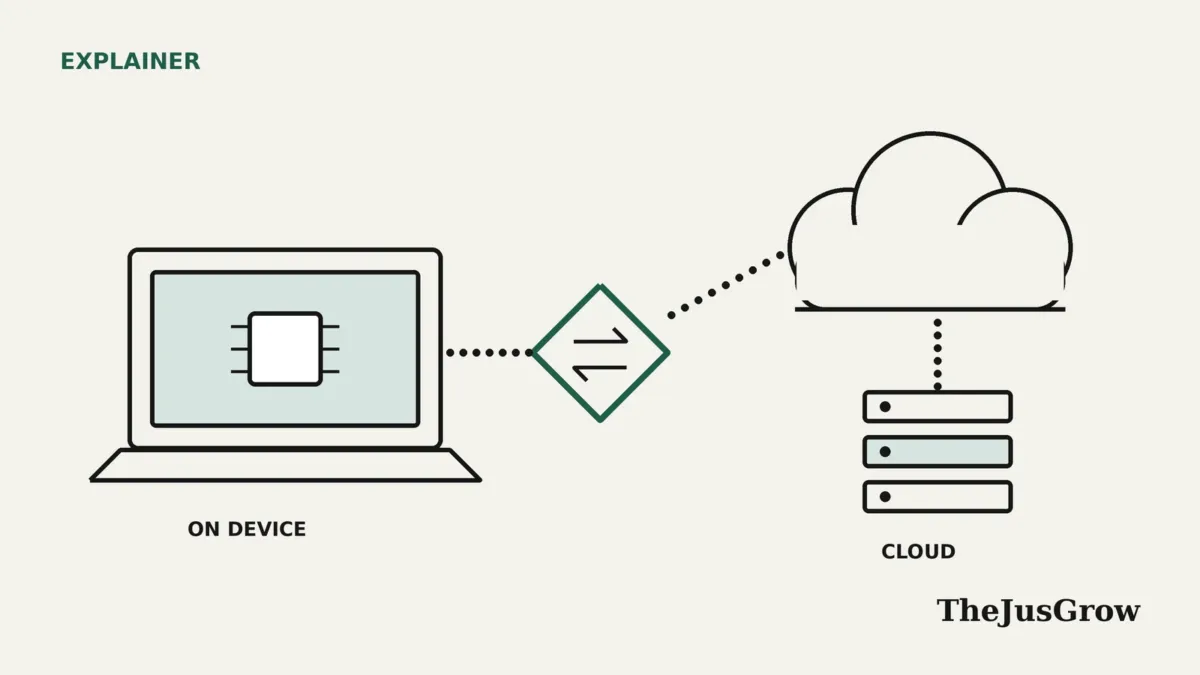
Hybrid AI is a simple idea with a clumsy name. Some AI requests run on a model stored on your own computer or phone. Others go to a much larger model in a data center. A hybrid AI system picks between the two for each task, so you get the cheap, private option when it is good enough and the powerful one when it is not.
Microsoft gave the idea a new label on 7 October 2026. In a Windows Experience Blog post, “Building Windows for hybrid intelligence”, Windows chief Pavan Davuluri described Windows as “a platform where agents can run locally when it makes sense, reach the cloud when they need to.” The post says intelligent routing, local models and a fast runtime let “work run in the right place for each task.”
Microsoft frames this partly as a money question. Its post says customers’ needs are “outpacing what their cloud budgets can support” and that they want to “make every AI token count without giving up frontier capabilities.” A token is the small chunk of text that AI services meter and bill. Satya Nadella went further on X, describing “unmetered intelligence to every desk and every home,” according to GeekWire.
For consumers, the practical version is Copilot. PCWorld reports that Microsoft describes hybrid intelligence as a balance between cloud services such as Bing and Copilot and the information already stored on your PC.
Local AI vs cloud AI: the trade-offs
Neither side wins outright. Each makes a different trade, which is why hybrid AI exists at all. The table sums up the differences in general terms, drawing on how Microsoft, Redmondmag and IT Brief describe them.
| Factor | Local model (on your PC) | Cloud model (data center) |
|---|---|---|
| Privacy | Sensitive content can stay on the device | Your request travels to a provider’s servers |
| Cost | Microsoft claims local tasks run “at no extra cost” | Providers meter usage in tokens |
| Capability | Smaller, compressed models handle simpler jobs | Larger frontier models take the hardest tasks |
| Hardware | Needs enough memory and a capable chip | Works from almost any device with a connection |
| Offline use | Possible in principle, though Microsoft hasn’t said which Copilot features work offline | Requires an internet connection |
Memory is the biggest constraint. IT Brief’s June 2026 explainer on “hybrid inference” notes that older or low-memory devices will struggle to run models locally. Compression helps. Windows Report says Microsoft’s MAI Code 1.1 Flash uses 3-bit precision to cut its size by nearly 80% while keeping a 256K context window on the device.
The same report describes an upcoming NVIDIA Nemotron model with more than 70 billion parameters, squeezed to 2-bit precision so it needs just over 20GB of memory. That is still more than the 16GB minimum on a Copilot+ PC, which is why the cloud stays in the picture.
How hybrid AI decides where a task runs
Jacob Andreou, the Microsoft executive in charge of Copilot, gave the clearest rule. For complex tasks Copilot uses the cloud, but “where cost and privacy matter more, it can delegate down to local models that run directly on your computer,” he said, as quoted by PCWorld. He told Computerworld that “Copilot will still use the cloud for the hardest tasks.”
Routing between models already happens in other products. GitHub’s Project HydraFusion, a research preview for developers, sends each coding request through one of three patterns:
- Single: one model handles the whole request.
- Cascade: an efficient model drafts, a quality gate checks the result, and a stronger model takes over if needed.
- Critique: a model from a different family reviews the draft, and the first model revises it once.
GitHub bills each model it uses at that model’s standard token rate. Microsoft plans to extend HydraFusion to local Windows models, with an experimental developer preview due “later in October.” As of 16 October, we have not seen confirmation that it has shipped.
What Microsoft hasn’t explained yet
Microsoft has not publicly detailed how Windows decides where each Copilot task runs. Its post talks about “intelligent routing” but gives no rules a user could check. For a hybrid AI system that handles personal files, that leaves real gaps. We could not find answers to these questions in Microsoft’s materials or the coverage around them:
- Which kinds of request stay local, and which go to the cloud?
- Does Copilot tell you when a task escalates?
- What happens to local files or context sent along with a cloud request?
- How long does Microsoft keep that data?
What Copilot will be able to see and do on your PC
Microsoft’s post lists three local capabilities coming to Copilot on Copilot+ PCs. These are the parts of hybrid AI that ordinary users will notice, and each comes with the phrase “with your permission.”
- Context: Copilot “can understand relevant content on your PC, including files and recent activity.”
- Actions: Microsoft lists “organizing files, assessing device diagnostics, troubleshooting issues, coding, and carrying out workflows directly on your device.”
- Models: Copilot uses “local compute for the right tasks while combining it with cloud intelligence when needed.”
Andreou told Computerworld that Copilot can do what a user can do, “always with permission.” Computerworld notes this resembles Copilot Actions, an experimental feature Microsoft showed Windows Insiders the year before.
The Autopilot tax demo
Autopilot, formerly known as Scout, is a long-running background agent that Microsoft calls “a persistent, proactive and personal agent.” It can now use local files and run on local models. It sits in private preview, so most people cannot use it. Our Copilot Autopilot guide covers it in more detail.
On stage, Autopilot gathered tax documents from several locations, renamed them, zipped them and drafted an email. It then paused and asked for approval before sending. GeekWire reports the tax details never went to the cloud during the demo because local models did the work.
That demo shows the appeal of hybrid AI neatly. Tax files are exactly the kind of content most people would rather keep on their own machine. Still, a staged demo is not a promise about every task.
Windows Search actions: the smaller change you may see first
The taskbar search box is getting thousands of quick actions. Typing a request can switch on dark mode, arrange windows, send a text message, change microphone volume, turn on Do Not Disturb or take a screenshot, according to GeekWire and PCWorld.
These actions started rolling out to Windows Insiders in the experimental channel on 7 October. Microsoft says Copilot answers inside the search box will be opt-in and will first reach select markets later this year. If you are not an Insider, you will not see either change yet.
Does my PC qualify for hybrid AI features?
The new Copilot abilities target Copilot+ PCs. Microsoft Support lists the hardware requirements:
- An NPU (neural processing unit) rated at “40+ Trillion Operations per Second (TOPS)”
- “16GB DDR5/LPDDR5” of RAM
- “256GB SSD/UFS or larger storage”
- A processor from Microsoft’s approved list
Microsoft expects Copilot features powered by hybrid intelligence to begin rolling out on Copilot+ PCs “in the coming months.” A footnote adds that you need Windows Update and that timing may vary by device, market and silicon platform. Andreou told PCWorld the new Copilot features, including Autopilot, would arrive “in the next couple of months.”
| Feature | Status on 16 October 2026 |
|---|---|
| Copilot local context, actions and models | Announced; rolling out to Copilot+ PCs in the coming months |
| Autopilot with local files | Private preview |
| Windows Search actions | Windows Insiders, experimental channel |
| Copilot answers in Search | Opt-in, select markets, later this year |
| HydraFusion with local models | Experimental developer preview due in October; not confirmed as shipped |
| Microsoft Execution Containers | Generally available on Windows 11 |
You do not need one of the new premium machines. Microsoft and Nvidia launched RTX Spark hardware alongside the announcement, including a Surface Laptop Ultra from $2,599 and a $5,999 Surface RTX Spark Dev Box (prices as of October 2026). Those target developers and creators. Their speed claims come from Microsoft and Nvidia tests on preproduction units.
Hybrid AI privacy: questions to ask before you turn it on
PCWorld reports that Andreou showed a “Hybrid Intelligence” toggle that you can switch off. PCWorld adds that the idea is that most people will leave it on. No source we found says whether the toggle starts on by default or where it will live in Settings.
Microsoft’s security pitch focuses on containment. Davuluri said current PC agents are “fundamentally insecure because they have broad system access,” GeekWire reports. Microsoft Execution Containers, now generally available, let organizations define which files and networks an agent can reach. Our guide to Microsoft Execution Containers explains how they work.
Identity controls can tell an agent’s actions apart from yours, according to Redmondmag. GeekWire noted that Recall, the 2024 feature that drew privacy objections, did not come up at the event. Forrester analyst Biswajeet Mahapatra told Computerworld he expects read-only help and search to catch on sooner than agents that change files. In his view, governance should rest on “controls, not on the AI itself.”
A checklist before you switch it on
- Find the Hybrid Intelligence toggle and note whether it starts on or off.
- Check what Copilot asks permission to read, and grant the narrowest access you can.
- Read each proposed action before approving it, especially file moves, deletions and emails.
- Watch for any sign that a task went to the cloud. If Copilot does not say, treat sensitive requests as if they might leave your PC.
- Review Microsoft’s privacy statement for retention details once the features ship.
Our guide to AI agent permission settings covers the general habits, and our piece on whether AI agents are safe explains the wider risks.
How Apple does hybrid AI
Apple has used a similar split since 2024. In its published Private Cloud Compute design, Apple calls on-device processing “the cornerstone” of its privacy approach. It sends a request to its own servers only when the task needs a larger model than the device can run.
Apple’s design makes three stated guarantees:
- Stateless processing: Apple uses your data only for that request, then deletes it.
- No privileged admin access to the servers.
- Published software images, so outside researchers can verify what the servers run.
The contrast is worth noting. In the sources we reviewed, Microsoft has not published an equivalent technical description of what happens to local data when a Copilot task escalates to the cloud. That is an open question, not evidence of a problem. Our Siri privacy explainer covers Apple’s approach in more depth.
Apple and Microsoft are not alone. IT Brief lists Intel, AMD, Nvidia and HP among the companies pushing hybrid AI, which the industry often calls hybrid inference.
Who should care about hybrid AI, and who can skip it
Pay attention if you own a Copilot+ PC, keep sensitive files on your laptop, or worry about what AI tools send to the cloud. Hybrid AI promises to keep simple, private tasks on the device, and the settings around it will decide how well that promise holds.
You can safely ignore it for now if your PC does not meet the Copilot+ requirements or you rarely use Copilot. Nothing changes until the features ship, and Microsoft’s announcement focuses on Copilot+ PCs.
In our view, patience is the smart move. Let the features arrive, read the settings and permission prompts carefully, and judge them on what they actually do rather than on demos.
Hybrid AI: FAQs
No. On-device AI runs entirely on your hardware. Hybrid AI combines on-device models with cloud models and chooses between them for each task.
PCWorld reports that Microsoft showed a “Hybrid Intelligence” toggle that you can switch off. Microsoft hasn’t said whether it starts on or off, or where it will appear.
GeekWire reports a Microsoft slide saying local models would run tasks “at no extra cost.” Treat that as Microsoft’s claim, since the company gave no pricing details.
Microsoft hasn’t said which features work offline. The new Copilot abilities target Copilot+ PCs, and the announcement did not mention plans for older hardware.
- Microsoft Windows Experience Blog, “Building Windows for hybrid intelligence” (7 October 2026)
- GeekWire, “Microsoft plays the Windows card in the AI game, with help from Nvidia” (7 October 2026)
- Redmondmag.com, “Microsoft’s New Windows Strategy Pushes AI Workloads Across PCs and the Cloud” (7 October 2026)
- Computerworld, “Microsoft will let Copilot act on local files on Windows PCs” (8 October 2026)
- PCWorld, “Windows Search is becoming your PC’s new AI-powered control center” (8 October 2026)
- Windows Report, “Microsoft Expands Hybrid Intelligence on Windows With Local Models, HydraFusion & llama.cpp” (7 October 2026)
- The GitHub Blog, “Project HydraFusion: Frontier quality via multi-model orchestration” (4 September 2026)
- Microsoft Support, Copilot+ PC hardware requirements (undated)
- Apple Security Research, “Private Cloud Compute: A new frontier for AI privacy in the cloud” (10 June 2024)
- IT Brief US, “Explainer: AI’s future is being split between device and cloud” (10 June 2026)